If you typed “torch search engine” into Google, there’s a decent chance you’re now looking at results for two completely different things without realizing it. There’s the dark web search tool. There’s an old Chromium browser that has nothing to do with Tor. And scattered between both, there’s a pile of fake mirror sites cashing in on the confusion. Let’s sort out which one you actually need, and how to use the real one without getting phished.
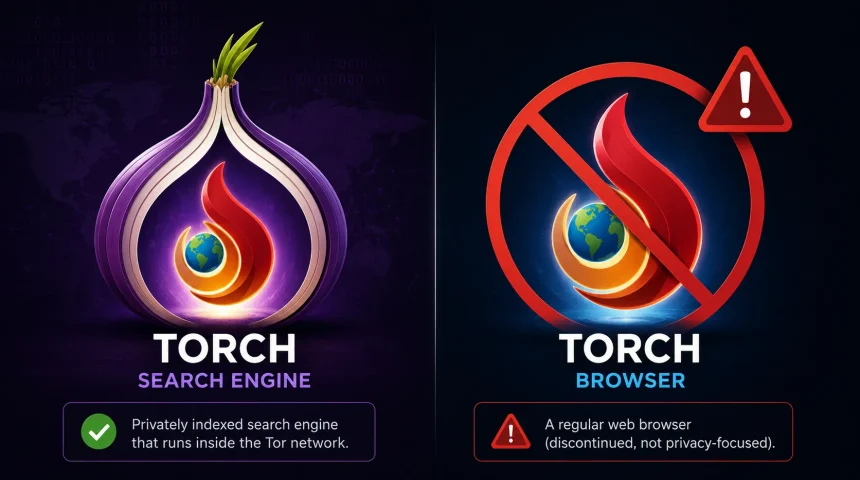
Torch is a search engine that indexes .onion websites on the Tor network. It’s not a browser. You need Tor Browser first, and Torch is a site you visit from inside it.
It’s been running since around 2012, applies no filtering to results, and keeps no logs of what you search.
Is Torch a Browser? (No, and This Trips a Lot of People Up)
Torch search engine is a website. You reach it through Tor Browser, type a search term, and get a list of .onion links back — the same basic idea as Google, just pointed at a different part of the internet.
“Torch Browser” is something else entirely, and it’s a real, separate piece of software. It was a Chromium-based browser released in 2012 by a company called Torch Media, built for downloading torrents and grabbing online video straight from the browser without extra software. It had nothing to do with Tor or the dark web. It was genuinely popular for a few years, then quietly stopped getting updated.
Its official download page has been dead since 2022, and searching “torch browser download” today only turns up third-party mirror sites hosting a years-old, unpatched Chromium build. Skip it. A browser with no security updates since around 2020 isn’t something you want on your machine, torrenting features or not.
So if you searched “torch web browser,” “torch browser software,” or “google torch browser” hoping to download an app, you’re thinking of the wrong Torch. And this mix-up isn’t just an English-language problem — plenty of Spanish-language searches for “torch navegador” run into the exact same confusion. If you’re trying to search the dark web, the thing you actually want is a website, not a download.
What Torch (the Search Engine) Actually Is
Torch, sometimes written TORCH or TorSearch, is a keyword search engine built to crawl and index .onion sites on the Tor network. It’s been around since roughly 2012, making it one of the longest-running tools of its kind still operating.
It works the way you’d expect from something built in the early 2010s: a plain search bar, a list of results with short snippets, nothing flashy. That simplicity is basically the whole product. Torch states it keeps no query logs and runs no analytics, which lines up with what most privacy-focused Tor tools claim about themselves.
Here’s the part that actually separates it from Google: Google finds new pages by following links between pages it already knows about. Most .onion addresses are never linked from anywhere on the ordinary internet, so a normal crawler never sees them to begin with. Torch works differently.
It crawls onion services directly, starting from directories and link lists like the Hidden Wiki, then follows .onion links from page to page. This is also why Torch, like every other onion search engine, only ever sees the slice of the dark web that’s already been linked somewhere. Invite-only forums and anything deliberately kept off public link lists stay invisible to it, no matter how long it’s been crawling.
Does Torch Really Index a Billion Pages?
You’ll see this claim repeated on nearly every page about Torch: over a billion indexed pages. A few older sources say one million instead, and almost nobody stops to ask why those two figures are a thousand times apart.
Both numbers trace back to Torch’s own claims about itself, not to any outside verification. The Tor Project publishes its own onion service statistics, and the number of unique, active onion addresses visible on a given day sits in the hundreds of thousands, not billions. That’s the entire pool that Torch, or anyone else, could possibly index, including duplicates, mirrors, and dead sites nobody ever bothered to remove.
So a billion-page claim isn’t necessarily a lie, if you’re counting every individual page across every mirror and dead listing without ever cleaning house. But it’s not a real measure of how much of the dark web you can actually find through Torch. Treat it as marketing copy, not a coverage guarantee.
How to Access Torch Search Engine (Step by Step)
You can’t type Torch’s address into Chrome or Safari and expect anything to load. Onion sites only work through the Tor network, so here’s what actually gets you there.
- Download Tor Browser. Go directly to the official Tor Project site, torproject.org, and download it for your system. Never grab it from a random third-party download page.
- Install it like any normal browser. No special setup needed. Open it once installation finishes and let it connect to the Tor network — this takes a few seconds longer than a normal browser opening.
- Find Torch’s current .onion address. This is the step where people get burned, and it deserves its own section rather than a link dropped here.
- Paste the address into Tor Browser’s address bar. Not Chrome, not Firefox, not your everyday browser. It has to be Tor Browser, since that’s the only thing that knows how to route .onion traffic.
- Search like you normally would. Type a term into the search bar, and you’ll get a list of .onion results with short descriptions, similar to a Google results page.
That’s genuinely the whole process. The tricky part isn’t the steps. It’s step three.
Where to Actually Find the Real Torch Link
Torch’s .onion address has changed multiple times over the years, and that’s created a small industry of fake “Torch link” pages ranking in Google — some of which openly admit they have no idea whether the address they’re posting still works. A few “verified link” pages we came across while researching this piece openly say they found their address on a random forum and can’t guarantee it’s safe or active, right before handing readers a clickable .onion link anyway. That is not a source you want to trust with anything.
We’re deliberately not publishing a specific address here either. Any address printed in a guide today can be dead, redirected, or quietly swapped for a phishing clone by the time you read this next month. Instead, pull Torch’s current address from a maintained directory inside Tor Browser, such as Ahmia, rather than from a static blog post. Directories get updated. Blog posts don’t.
One more thing worth knowing: because Torch’s address rotates and the name gets searched constantly, typo and lookalike domains are common too. If you’re typing “tourch browser,” “torch brpwser,” “toroch,” or “torcho” because that’s genuinely what you meant to type, know that fake pages are actively built to catch exactly those misspellings. A typo in a search bar is exactly the kind of traffic phishing pages are designed to catch.
Is Torch Free to Use? Do I Need to Download Anything?
Yes, and no. Torch itself is completely free. No account, no subscription, and no login. You don’t download anything from Torch, since there’s no such thing as a real “torch search engine download” in the software sense. It’s a website you visit, not a program you install. The only thing you actually need to install is Tor Browser, which is also free, and it works for every .onion site, not just Torch.
Torch on Android and Mobile
If you’re searching “torch search engine android,” here’s the straight answer: Torch works on mobile the same way it works on desktop, because it’s just a website. What you need is Tor Browser for Android, published officially by the Tor Project through Google Play and F-Droid. Install that, open it, and navigate to Torch’s onion address the same way you would on a computer.
Worth thinking about before you do this on a phone: your device is generally worse at containing mistakes than a dedicated setup, since your email, banking apps, and photos are usually one swipe away. If you’re just curious rather than doing something that genuinely needs strong anonymity, that trade-off is worth a second thought before you start clicking around an unfiltered index on the same phone you use for everything else.
What Torch Can Find, and What It Quietly Misses
Four things are worth knowing before you treat a Torch result as reliable:
- It doesn’t verify anything. A result appearing on Torch means a crawler found it, not that it’s legitimate, safe, or what it claims to be.
- It doesn’t moderate. There’s no filter sitting between the index and your screen. This is also exactly why it’s a poor tool to hand to someone who doesn’t already understand what they might run into.
- It misses private services entirely. Invite-only forums, vetted marketplaces, and anything never linked from a public page stay outside the index, no matter how long Torch has been crawling.
- It doesn’t clean up dead listings. Onion services disappear constantly, and dead pages linger in the index for years. A results page mixes live sites with ghosts, with no way to tell which is which just by looking.
If you’re checking whether your own data shows up somewhere on the dark web, a Torch search turning up nothing is not the same as a clean bill of health. Most stolen data trades hands in private channels, a public crawler never touches. Dedicated monitoring covers ground, a manual search never will.
Torch vs. Other Tor Search Engines
Torch isn’t the only option, and it helps to know where it sits against the others before picking one.
| Engine | Indexes | Moderation | Best for |
|---|---|---|---|
| Torch | .onion sites | None | Broad, unfiltered discovery |
| Ahmia | .onion sites | Filters out abuse material | A safer default for general use |
| Haystak | .onion sites | Limited | Larger historical index, paid tier for full access |
| DuckDuckGo .onion | Clearnet only | Standard | Private clearnet search, not dark web content |
Ahmia is the one most people should actually start with. It’s been associated with the Tor Project since 2014 and actively filters out abuse material, which Torch does not attempt to do. Torch’s appeal runs the other direction: an unfiltered index surfaces things a curated one deliberately strips out, which matters for research but adds real risk for casual browsing. For a closer look at how the dark web differs from the deep web in general, our deep web vs dark web guide breaks down the layers.
Is Torch Legal? Is It Safe?
These are two different questions, so here are two different answers.
Legal: Yes. Using a search engine isn’t against the law in the US, UK, or EU, whether it’s Google or Torch. What determines legality is what you do with what you find, not the tool you used to find it. Accessing or buying anything illegal is illegal, regardless of which search box led you there.
Safe: Not really, for casual use. Results are unfiltered, so you can land on something disturbing from an ordinary-looking search term with zero warning. On top of that, Torch is heavily impersonated. Its address has rotated many times, and convincing phishing clones exist purely to steal credentials or push malware onto anyone who lands on them by mistake. No logging by Torch itself doesn’t protect you from a fake copy of Torch.
Frequently Asked Questions
Is Torch a browser?
No. Torch is a search engine you reach through Tor Browser. It doesn’t replace Tor Browser, and there’s nothing to install.
Is Torch the same as “Torch Browser”?
No, and this trips a lot of people up. Torch Browser was a separate, unrelated Chromium browser for torrenting and media downloads, discontinued for years. Downloading it today from any third-party site is a bad idea.
Does Tor Browser work with Torch?
Yes. That’s the only way Torch works. Torch is an .onion site, and .onion sites only load inside Tor Browser.
Is there a Torch app for Android?
No dedicated app. Install Tor Browser for Android from official Tor Project channels, then visit Torch’s onion address the same as on desktop.
Do I need to pay for Torch?
No. Torch is free, and so is Tor Browser, which is the only thing you actually need to install.
What’s the best search engine for Tor?
There isn’t one single best answer. Torch gives you the widest unfiltered index, Ahmia is the safer curated default, and most people get a fuller picture running the same search through both.
How do I know I have the real Torch link and not a fake one?
Don’t trust a random blog’s hardcoded address. Pull the current link from a maintained directory such as Ahmia, from inside Tor Browser.
Conclusion
If you’re just curious, install Tor Browser from the official site, pull Torch’s current address from a maintained directory rather than a random blog post, and treat every result as unverified. If you searched “torch browser download” hoping for the old Chromium browser for torrenting, stop there, that software is dead, and the download links circulating today aren’t something you want on your machine.
And if you’re really checking whether your own data is exposed somewhere on the dark web, a Torch search is a decent first look but a poor final answer, since it can’t see the private corners where most stolen data actually changes hands.