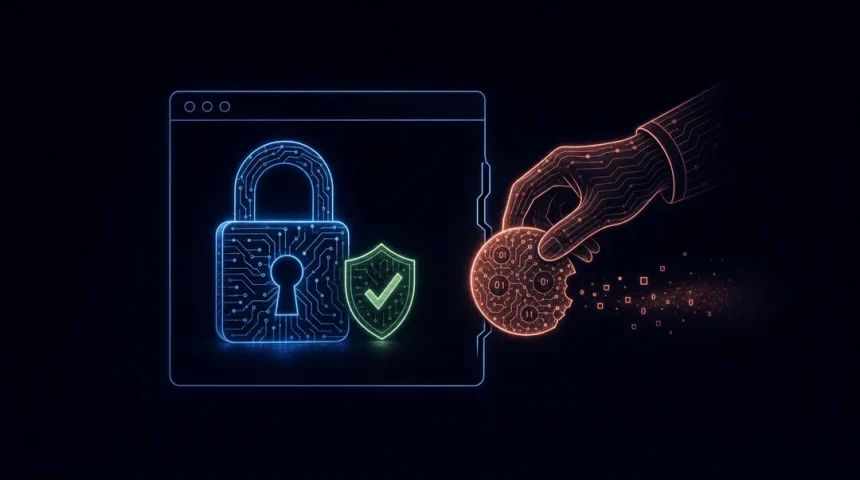
If you are wondering why attackers can still steal your live session cookies despite enabling factor authenticators like MFA or 2FA, then this article is for you. Session hijacking or “token theft” has become rampant, especially in 2026, that internet users need to be wary of it. In fact, it has become one of the top threats in the credential-theft landscape that is being used to steal session cookies and tokens. Flashpoint recorded 7.4 million devices infected with infostealer malware in the first half of 2026 alone, a 27% rise on the previous six months.
It is popular among threat actors for its ability to bypass MFA and gain unauthorised access to session cookies without the user’s detection. This kind of attack leads to the theft of information from your device, even though the attacker never sees your password or triggers your second-factor authentication. This is because a stolen session cookie carries your logged-in session from the browser, letting whoever holds it navigate the website as you.
Nevertheless, if you are interested in learning and knowing more about how session hijacking works and how to stop it, then read this article to the end. In this article, we put together a comprehensive context, explaining everything you need to know about token theft in plain language.
Furthermore, at the end of this blog post, you will get to know why enabling MFA will not save you from session hijacking and the actual click paths to revoke sessions in Google, Microsoft, Apple, Meta, and your bank. Without delay, let’s get started!
Session Cookies And Tokens: What Are They?
Both session cookies and tokens are mechanisms to maintain users’ authenticated state, but they differ in location, scalability, and security handling.
Session cookies are cookies that only exist for the duration of a certain session. It is a tiny text/character file stored inside your browser, such as Chrome, Safari, and Firefox. Strictly speaking, a session cookie is deleted when you fully quit the browser, not when you close a tab. However, the login cookies that keep you signed in (and that attackers steal) are usually persistent cookies that stay valid for weeks or months, which is exactly why stealing them is so valuable. Examples of session cookies include login sessions, multi-page forms, shopping carts on an e-commerce website, live chat widgets, and more.
A standard session cookie format will look like:
sid=s%3Av7x9m2q4w8n1p3r5t6y8u9i0o1p2a3.abc123def456
form_session=f4e5d6c7b8a9
wishlist=wish_98765
chat_session=ws_xyz789
On the other hand, a session token is a unique credential generated the moment you log in to a website. It is a short-term credential that links or ties your online activity to an authenticated identity for a limited period of time. It is used to authorise requests in APIs or authenticated systems. Some tokens are random strings of letters and numbers; others, like the JSON Web Token (JWT) below, are encoded and digitally signed data. Examples of session tokens include login session tokens and API access tokens.
A standard session token (JWT) format will look like:
eyJhbGciOiJIUzI1NiIsInR5cCI6IkpXVCJ9.eyJhcHBsaWNhdGlvbl9pZCI6ImFwcF83ODk2MCIsImN1cnJlbnRfc3RlcCI6MiwidG90YWxfc3RlcHMiOjQsImZpZWxkcyI6eyJmaXJzdF9uYW1lIjoiU2FyYWgiLCJsYXN0X25hbWUiOiJKb2huc29uIn0sImlhdCI6MTc0MDAwMDAwMCwiZXhwIjoxNzQwMDg2NDAwfQ.xyz456signatureWith access to this information, attackers can gain a lot from compromising your identity. This is because stolen session cookies allow threat actors to impersonate you, potentially bypass authentication measures like MFA, and steal information or digital assets accessible with your logged-in accounts. This is one of the reasons why session hijacking is so popular.
What is MFA?
Fast forward to the present digital landscape, password alone is no longer enough to protect your devices or accounts (100%) from cyber criminals and attacks. That is when MFA comes in. MFA, short for Multi-Factor Authentication, is a type of security measure or process that involves enabling more than one security verification procedure to confirm your identity and authorized access.
It serves as a layer of protection for accounts from threat actors who are looking for any means possible to exploit you or take over your account. MFA combines at least two different types of factors:
- Something you know: a password, PIN, or security question
- Something you have: a phone authenticator app, hardware security key, or passkey
- Something you are: biometrics such as face scan, fingerprint, and voice recognition
However, there is a sophisticated method known as “session hijacking,” “cookie theft,” or “token theft” that’s being used to bypass MFA. It has become a concern in 2026 because it’s beating and bypassing security defenses. The implication of this is that MFA is not enough anymore; there is a need to tighten up the security measures.
What Is Session Hijacking?
Session hijacking is described as a cyberattack tactic whereby a threat actor steals a valid user’s active online sessions, such as cookies and tokens or any information stored in the browser. This leads to an unauthorized takeover of an authenticated web session by capturing or forging the session token that identifies the user to an application. It is tracked by MITRE ATT&CK as Steal Web Session Cookie (T1539).
Unlike credential theft, session hijacking occurs after successful authentication, so factor authenticators (MFA & 2FA) have already done their job and are never asked again. The attacks are mostly successful because users’ tokens are used by online apps and websites to sustain user sessions.
After a successful attack, the actor then assumes your identity and gets complete access to your account without ever requiring your password or MFA code. That is because the criminal took the “key” that confirms your MFA was finished successfully.
For instance, when you log in to your account, say, your email account, your session is authenticated with a token, which essentially proves that you’re legitimate and authorized to access the account. So you don’t need to re-enter your password with every click.
However, if someone were to steal or access the token, they could access the account without needing your password or MFA code. That is because token or cookie theft bypass MFA, hence informing the application that you (in this case, the impersonator) are already authorized to access the email account.
Simply put, session hijacking involves stealing session cookies and tokens. These stolen keys allow anyone possessing them to have access to the respective application or program without needing to prove they are the legitimate owner or have authorised access.
How Session Hijacking Works
You may be thinking that session hijacking works like regular credential theft, where the actor guesses a password or deceives a user into accepting an MFA prompt in order to take over an account. Unfortunately, session hijacking operates differently, especially in this digital age where cybercriminals are advancing their gameplay with malicious AI tools.
Nevertheless, session hijacking follows a predictable attack pattern, allowing attackers to obtain session cookies without causing another sign-in challenge. One long-standing attack method is Man-in-the-middle (MiTM) session interception. It involves placing the adversary between the user and the application server. All communication between endpoints, including session tokens, is intercepted by the attacker. Today, HTTPS encryption makes this much harder on most websites, so it mainly works on unencrypted connections or poorly secured public Wi-Fi.
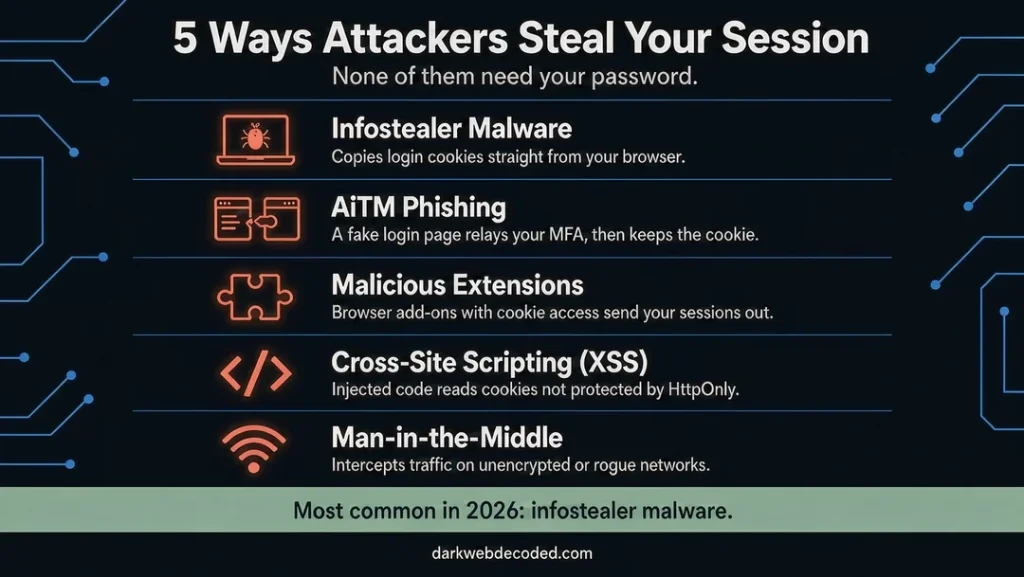
Beyond the man-in-the-middle attack (where the adversary is placed between the user and the application server), there are four other ways in which session hijacking can be executed. These include:
Method 1: Info Stealer Malware
This is the most popular hijacking technique in 2026. Google notes that session theft usually starts when a user unknowingly downloads malware. By this approach, the attacker installs a stealer malware on your device. The malware operates silently while extracting your session cookies and tokens that are stored in the browser database. The stolen session cookies are immediately copied and packaged into “stealer logs” before being exfiltrated to an attacker-controlled server, and are often resold on dark web markets and Telegram channels. Examples of infostealer families that can be used for session hijacking include:
- Vidar (Vidar 2.0 became the most widely used infostealer by early 2026)
- StealC
- LummaC2 (disrupted by law enforcement in May 2025, but has since resumed activity at a smaller scale)
- Acreed
- RedLine and Raccoon (both disrupted by law enforcement, but older stealer logs from them still circulate)
New families keep appearing too, such as the stealer spread through fake Cloudflare pages on hacked websites.
Method 2: AiTM (Adversary-in-the-Middle) Phishing
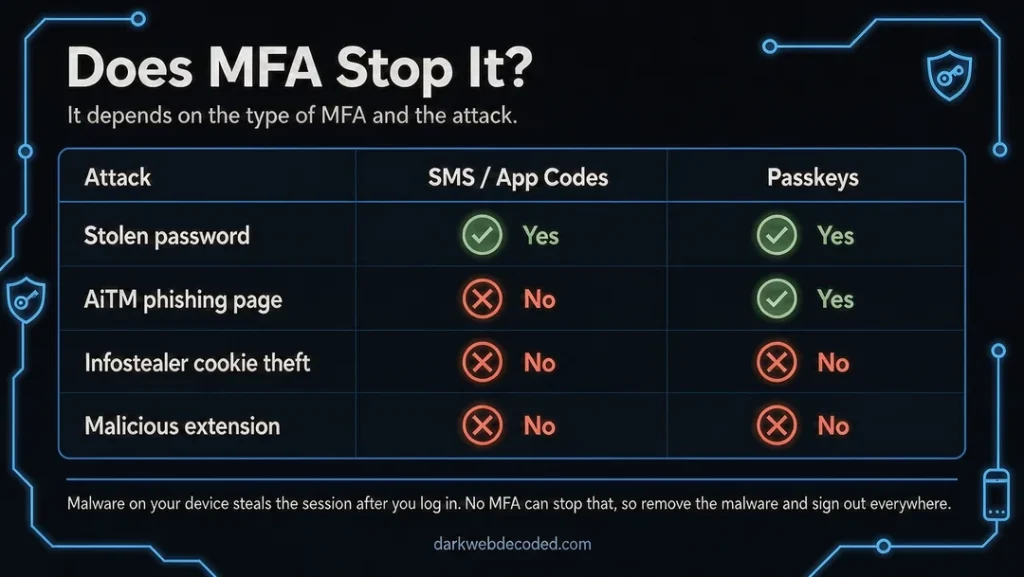
Note that AiTM phishing does not break MFA; rather, it tricks you into completing it before stealing the result. As Microsoft’s threat researchers explain, this is not a vulnerability in MFA itself. So how does this attack happen?
The adversary-in-the-middle (AiTM) phishing is known as the “proxy login” trap. It uses sophisticated proxy sites or lookalike pages to stand between you and the authentic website or application. These sites appear legit, and everything seems to function right. But once you log in and complete the MFA authentication, attackers intercept and steal your password and the session token generated after signing in.
The good news is that phishing-resistant MFA, such as passkeys and FIDO2 security keys, stops this attack. A passkey is tied to the real website’s domain, so it simply will not work on a lookalike proxy page.
Method 3: Cross-Site Scripting (XSS) and Client-Side Injection
With cross-site scripting (XSS) vulnerabilities, attackers can insert harmful JavaScript (JS) into web applications that will execute in your browser context. This is possible if the web application is improperly designed.
Unless the HttpOnly flag is set, the harmful JS code can read and exfiltrate session cookies to servers under the attacker’s control while operating in your browser. It is worth noting that the script can only read non-HttpOnly cookies that are stored in the domain; a key defence is enforcing the HttpOnly flag on all session cookies. Keep in mind that tokens stored in the browser’s local storage cannot be protected this way, and HttpOnly does not stop the XSS script itself from running.
Method 4: Malicious Browser Extensions
A malicious browser plugin, even one downloaded from the official Chrome Web Store, can steal authentication tokens and allow total account takeover through session hijacking. This is because browser extensions have access to cookies, local storage, and network requests. A malicious extension was also the likely culprit in the Twitch streamer data leak.
In January 2026, researchers at Socket found five extensions on the Chrome Web Store posing as productivity tools for enterprise resource planning (ERP) and human resources (HR) platforms, including Workday, NetSuite, and SAP SuccessFactors. The attacker aims to take over your accounts completely by exfiltrating your session tokens for these platforms, while some of the extensions also blocked the admin pages security teams would use to respond.
Here are the five malicious Google Chrome web browser extensions that were found by cybersecurity researchers. Check the table below:
| Extension Name | Extension ID | Published By | Installs | Status |
|---|---|---|---|---|
| DataByCloud Access | oldhjammhkghhahhhdcifmmlefibciph | databycloud1104 | 251 | Reported for takedown |
| Tool Access 11 | ijapakghdgckgblfgjobhcfglebbkebf | databycloud1104 | 101 | Reported for takedown |
| DataByCloud 1 | mbjjeombjeklkbndcjgmfcdhfbjngcam | databycloud1104 | 1,000 | Reported for takedown |
| DataByCloud 2 | makdmacamkifdldldlelollkkjnoiedg | databycloud1104 | 1,000 | Reported for takedown |
| Software Access | bmodapcihjhklpogdpblefpepjolaoij | softwareaccess | 27 | Reported for takedown |
Source: Socket Threat Research. If you find any of these IDs installed, remove the extension and reset your password from a clean device.
How to Strengthen Your MFA Against This Danger
The good news is that by changing a few crucial settings, you can lower the danger of session hijacking. Here are some of the things you can do to strengthen your MFA against token theft. Points 1 to 4 are mainly for businesses and IT teams; points 5 to 7 are steps anyone can take.
- Conditional Access Regulations: This is one of the strongest defenses an organisation has against session hijacking. With Conditional Access, you can establish guidelines that specify where and how people can access your information or company. Important regulations to put into place include:
- Preventing access unless the login originates from a safe, company-managed device
- Turning off less secure, older authentication methods that are easily exploited and do not enable contemporary MFA.
- Reduce the length of session timeouts: Some session cookies are active for a long period; many cookies and tokens stay valid for weeks or even months. To ensure a safe internet experience while preventing session hijacking, cut down the session timeouts. For sensitive applications, we recommend cutting down to a decent number of hours rather than days.
- Make Use of Risk-Based Authentication: Suspicious login signals, such as an attempt from an unknown location, an anonymous IP, or a malware-infected device, can be identified by some platforms. When these high-risk signals are identified, you can set up your MFA system to demand an extra verification step, thereby preventing a hijacked session.
- Make an Advanced Endpoint Security Investment: Strong endpoint security is essential since malware frequently initiates session hijacking. The malware intended to steal session cookies can be found and quarantined by a contemporary Endpoint Detection and Response (EDR) system before it has a chance to complete its job.
- Switch to passkeys where offered: Passkeys are phishing-resistant, so they block AiTM proxy pages that ordinary SMS codes and authenticator-app prompts cannot.
- Keep your browser updated: In April 2026, Google made Device Bound Session Credentials (DBSC) available to Windows users in Chrome 146, with macOS to follow. DBSC ties your login session to a key stored in your device’s security chip, so a stolen cookie stops working on the attacker’s machine. It is not a cure-all: malware running live on your device can still misuse the session in place.
- Audit your browser extensions: Remove anything you don’t recognise or no longer use, especially extensions that ask for access to cookies or “all websites.”
How To Detect Session Hijacking In 2026
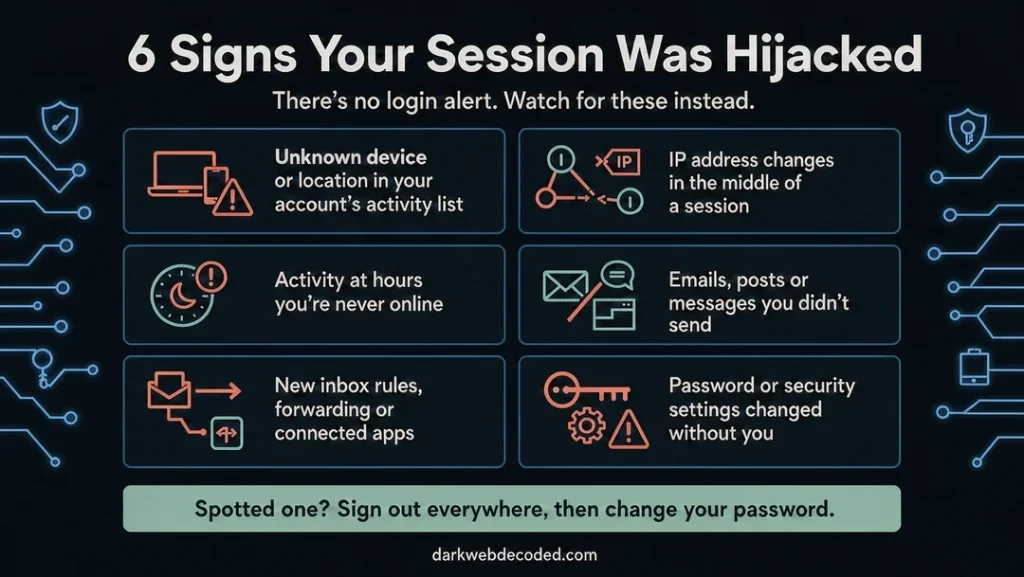
The scariest part of session hijacking is that you might not even notice it. Because there won’t be an intruder login alert. No MFA-triggered alert. And sometimes, no suspicious IP address alert. This is because, to the application, you are the one who logged in. Nevertheless, here are a few ways you can detect session hijacking:
- During an active session, a sudden change in IP address suggests possible hijacking.
- When a session suddenly starts from a new hosting or internet service provider, it is also an indication that your session cookies may be at risk.
- Also, take note of changes in the browser and device fingerprint in the middle of a session. That is, be more cautious if your session starts on Chrome and continues on Firefox without requiring re-authentication. It means your session was probably stolen and replayed.
- Inconsistency in the operating system indicates session cookie theft. That is the abrupt switch across iOS, Android, and Windows devices without logical explanation or authorisation.
- Changes in access patterns as compared to past behavior indicate compromised sessions.
- Suspicious behavior is identified by time-of-day breaches. That is, sessions that are active during times when the authorized user is never at work, particularly when paired with geographical irregularities, are a clear sign of hijacking.
- There is likely a token theft if an existing integration suddenly asks for permission that it didn’t previously need.
- You can also detect a token theft attack if there are new integration approvals from dubious sources or locations.
If you suspect an infostealer, it is also worth running a free dark web scan to see whether your email has turned up in known breaches.
Session Hijacking vs Credential Theft
Don’t mix it up! Session hijacking is not credential theft. There exist significant differences, even though both are cyber attacks that allow attackers to pose as users. Credential theft targets login details such as usernames and passwords, and it happens before authentication.
On the other hand, session hijacking targets active access such as session cookies and tokens. The attack takes place after login, allowing the attacker to circumvent the sign-in process entirely. In fact, session hijacking is typically more difficult to detect than regular Credential theft attacks because the activity mimics the account owner until the token expires.
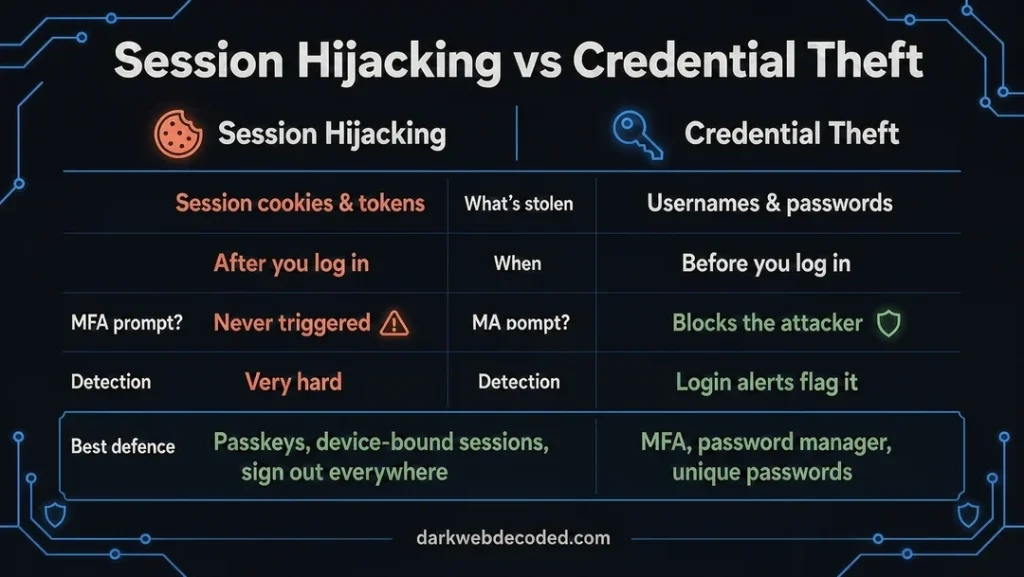
Here are some of the key differences between session hijacking and credential theft:
| Metrics | Session Hijacking | Credential Theft |
|---|---|---|
| Stolen Information | Session cookies and tokens | Username, password, email address, phone numbers, etc |
| Impersonation | Reuse valid session cookies and tokens | Enter stolen credentials to access the account |
| When it works | After authentication | Before authentication |
| Does MFA stop it | Usually not, because MFA is never triggered. Phishing-resistant MFA (passkeys) does stop AiTM phishing | Yes, MFA makes it harder to take over an account even though the password and username have been compromised |
| User detection (difficulty) | Very difficult (Mostly undetected) | Moderate (Login anomalies) |
| Common attack methods | MITM, AiTM, Cross-site scripting, info stealer, and malicious plugins | Phishing, social engineering, smishing, password reuse, and credential stuffing |
| Detection | Hard to detect, but can be noticed by changes in behavioural activity | Failed login attempts, login alerts, and new login and device notifications |
| Best Defence | Device-bound sessions (DBSC), passkeys, short session lifetimes, endpoint protection, and session monitoring | MFA, biometrics, password managers, and conditional access |
Why “Change Your Password” Is Incomplete Without Signing Out Everywhere?
Changing your password alone does not mean you are completely safe from an attacker. In fact, it is not enough to stop a session attack. This is because if an attacker has already logged in with a valid session using your tokens and cookies, changing the password might not invalidate their existing login session.
To force the attacker to sign out, you must sign out everywhere or revoke all active sessions. This will tell the program that it should delete the session cookies or token recorded after logging in. This approach will effectively log out every device and browser from its server, including the attackers.
It is also worth noting that changing the password alone will only stop new logins from unknown passwords. Hence, signing out everywhere is very crucial because it forces a re-authentication for all live sessions, which only you may actually have. This way, you can take control of your account and boot the attacker out. If malware is still on your device, clean it first, otherwise the attacker can simply steal your new session.
Below is a step-by-step guide on how to revoke sessions in programs such as Google, Microsoft, Apple, Meta, and your bank.
Google Account
- Open your Google Account
- Go to “Security & sign-in” (labelled “Security” on some versions)
- Under “Your devices,” select “Manage all devices”
- Review the signed-in devices and sessions
- Click on the device you don’t recognise or wish to sign out from
- Select the option for “Sign out” to revoke access. If several sessions share the same device name, sign out of each one
- Afterwards, you can change your password if needed
Microsoft Account (Such as Hotmail, Outlook, Xbox, etc)
- Sign in to your Microsoft account and open the “Advanced security options” page on the security dashboard
- Scroll down to “Sign out everywhere” and select “Sign out”
- Review the “Recent Activity” page to check for suspicious sign-ins
- Afterwards, you can change your password if needed
Note that Microsoft does not let you sign out of one device at a time, and signing out everywhere can take up to 24 hours. It also does not cover Xbox consoles, which have to be signed out separately.
Apple Account (formerly Apple ID)
- On your iPhone or iPad, go to Settings and tap your name (on a Mac, open System Settings and click your name). On the web, sign in at account.apple.com and select “Devices”
- Scroll to the list of devices signed in with your Apple Account
- Review the list of devices
- Click on any unfamiliar or unrecognised devices and select the option “Remove from Account” to revoke access and force a sign-out
- Change your Apple Account password. A device that is still signed in may reappear in the list, and a password change forces it to sign in again
Meta Account (Facebook, Instagram and Threads)
- Log in to your Meta account (Facebook, Instagram, or Threads)
- Open Accounts Center from the Settings menu
- Select “Password and security”
- Select “Where you’re logged in,” then choose your account
- You will see a list of active sessions and devices
- Scroll down and select “Select devices to log out“
- Pick the devices you don’t recognize, or choose “Select all,” then tap “Log out” and confirm
Bank Account
To revoke your access to your bank account, follow the steps below:
- Contact your bank support using the phone number on the back of your card or on the bank’s official website, not a number from an email or text message
- Report suspicious activity
- Request a sign-out-everywhere
- The bank will provide a step-by-step guide on how to carry out a force sign-out on all active sessions
In Conclusion
Despite the fact that session hijacking has not been solved and it is still a serious threat in 2026, MFA is still very much essential because it offers a level of protection. It stops most account takeovers that rely on stolen passwords, makes basic account takeover difficult, and makes phishing more difficult to pull off. Phishing-resistant MFA such as passkeys goes further and blocks AiTM phishing outright.
Since session hijacking attacks are still prevalent today, defending your information and device against them is crucial. To detect it, look out for the behavioural changes surrounding the activity, including abnormal access patterns that indicate a session is being reused. Some behavioural changes to look out for include changes in IP address, changes in geolocation, changes in browser, and many more. If you think your details have already leaked, read our guide on what to do if your information is on the dark web.