Dark Web Iceberg Explained: When you surf the internet, for instance, scrolling through webpages or running a Google search, you are only skimming the surface. In fact, the internet we use in our daily lives is just a tiny fraction of the internet, much like the tip of an iceberg. But what’s beyond the surface of the internet?
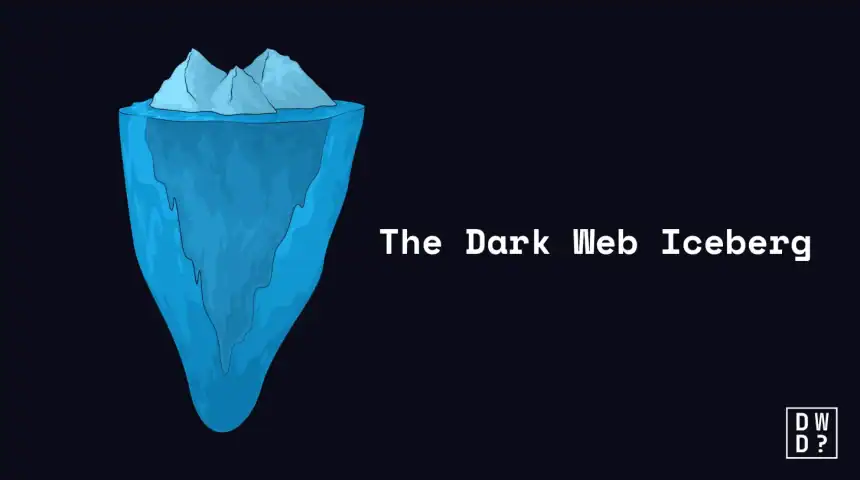
The Dark Web Iceberg is a well-known graphic metaphor that is used to illustrate the various layers of the internet. It involves a familiar, searchable internet and a private, unsearchable area where both legal and illegal activity can occur.
One caution before we go further. The version of the iceberg that circulates on social media usually adds extra layers below the dark web, with names like Marianas Web and “Level 6,” guarded by imaginary quantum computers. Those layers do not exist. They come from the same corner of the internet that produced the red room myth, and the real structure stops at three.
In this article, “Dark Web Iceberg Explained,” you’ll understand what the iceberg metaphor represents, how the internet as a whole functions, what the different layers of the Internet are, how it operates, and why it matters to your security.
Dark Web Iceberg: Beyond The Surface of the Internet
In the early days of the web network, people used pages with lengthy lists of HTML links to find information. Fast forward to recent times, users can now locate information considerably more easily thanks to the emergence of automated search engines like Google, Yahoo, and Bing.
These search engines use sophisticated automated programs called web crawlers, spiders, or bots to crawl the web, browse, scan, and download content from the internet. However, there’s more to the internet than just these activities. In fact these cover only a small portion of the web space.
For better understanding, think of the internet as an iceberg, and our everyday use of the internet is only a small, visible portion of it, known as the “surface web.” Beneath this visible layer lies the “deep web,” a large network housing everything from private databases to secure communications. Beyond the deep web is the “dark web,” a dark place where anonymity is the norm.
In short, the internet is categorized into three layers; the Surface Web, the Deep Web and the dark web. The surface web is at the top, the deep web is in the middle, and the dark web lurks ominously at the bottom. Each layer has its own acceptable applications, security concerns and diverse functions.
Let’s have a deeper look on each of these layers, understanding how they work and how to operate them.
What is the Surface Web?
The surface web is a small portion, about 4%, of the internet that the general public can easily access using popular search engines like Google, Yahoo, and Bing.
For most people, when they hear or think of the internet, this is what comes to mind first. However, it’s just one of several internet layers.
The surface web is made up of indexed contents, allowing search engines to fully see and access it using automated software programs such as crawlers or Spider.
What the crawler does is to trace and follow every link, starting from a known webpage, and add the new pages to a collection of databases called an index. Thus, whenever you browse the internet, let’s say you search for “Pizza” using Google, or other search engines, it displays a list of public webpages already indexed in its server.
In summary, the surface web is the visible part of the internet. Think of it as a public space where anyone can access without needing a key or passcode. It includes everything you find on Google, social media platforms and online shopping sites. It’s easy to access using any normal browsers like Chrome, Firefox, or Safari.
What is the Deep Web?
Despite the fact that the web is constantly expanding, the search engines cannot access the vast majority of web pages. These include unpublished blogs, private forums, online banking portals, email accounts, private databases, and so on. Hence, we refer to this layer of the internet as the deep web.
The deep web is a large area of the internet, about 90% to 95%, that is not indexed by conventional search engines. Those percentages trace back to Michael K. Bergman’s 2001 white paper in the Journal of Electronic Publishing, which coined the term “deep web” and estimated the unindexed portion to be hundreds of times larger than the searchable surface. No rigorous update has been published since, so treat these figures as an order of magnitude rather than a measurement. Unlike the surface web, it is private. That is, all the contents are protected by paywalls, login screens, or access permissions.
These pages aren’t indexed and you can’t just Google your way into these locations, unlike the surface web. Think of it as a locked house where valuables are kept, and require a passcode to enter.
The deep web is inaccessible to search engine crawlers. Hence, none of its contents are indexed and cannot be seen by Google, Yahoo, Bing, or any other search engines.
What is the Dark Web?
The dark web is the very bottom of the iceberg. It is a more complex layer of the internet found within the deep web. It’s a tiny portion of the deep web that is encrypted, less accessible to the general public, and not reachable by conventional web browsers.
The dark web is known as the most hidden part of the internet. In fact, its defining feature is total anonymity, making it nearly impossible to follow users or the locations of the websites.
To access this network, certain software is needed because its contents are not indexed, neither are they behind passcode, logins, or paywalls. One of the popular options is “The Onion Router,” or Tor for short. Tor itself was not built by criminals — the onion routing behind it started as a US Naval Research Laboratory project, and our guide on who created the dark web traces how a government privacy tool ended up at the bottom of this iceberg.
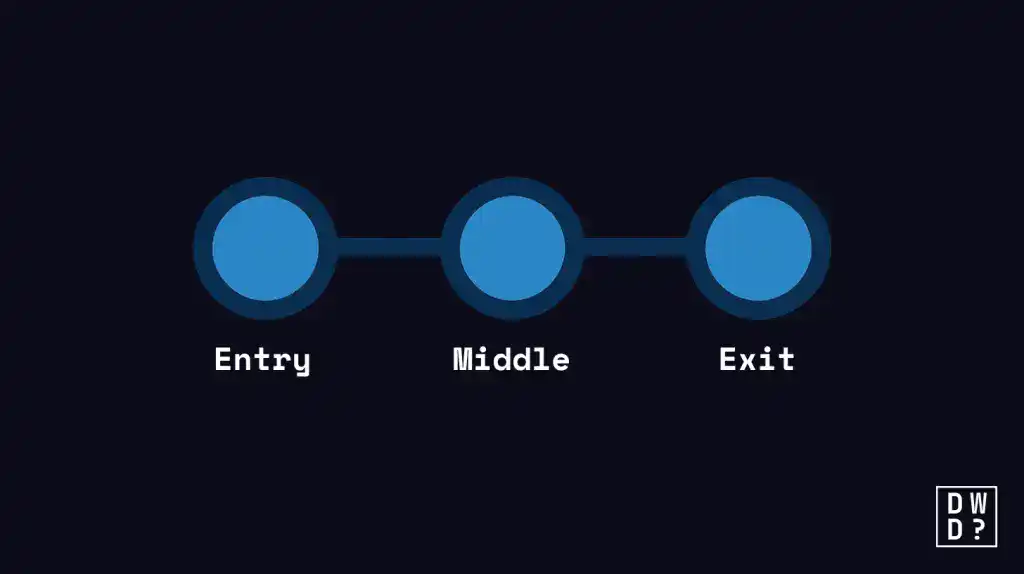
The Tor browser is a program that uses the .onion url, which is constructed on overlay networks that offer several levels of encryption. That is, when you send data in the dark web or Tor browser, it’s wrapped in multiple encrypted layers and bounced through different servers known as the three-node routing system before it gets to the last destination:
- Entry Node: This is the initial node which the computer of the user is connected with. It can identify the true IP address of the user but it is not aware of the contents of the traffic being passed.
- Middle Node: This node is a node that accepts the encrypted traffic of the entry node and forwards it to the exit node. It is meant to be placed between the guard and exit so that they cannot talk to one another. The central node is aware of neither the user nor the end destination.
- Exit Node: This is the last node of the chain, which decrypts the outer most part of the encryption and forwards the information to its destination (e.g. a website). The exit node is aware of the name of the visited site but has no idea what the true IP address of the user is.
Desktop is the straightforward case. On phones the picture is messier — Android runs Tor Browser directly, while iOS has no official Tor Browser at all, which is where most of the fake “dark web” apps on the App Store come from. The Tor Project recommends Onion Browser and Orbot for iOS instead, and our guide to dark web apps for iOS and Android covers what is genuine and what is not.
The dark web has both legal and illegal purposes. These include:
- For anonymity and privacy for authorized users
- Safe means of communication for whistleblowers and media — news organisations including the Washington Post and the Guardian run SecureDrop submission systems as onion services for precisely this reason
- As a forum for political dissidents under oppressive governments
- Marketplaces for illicit products and services
- A space for cybercrime
- Fraud involving money
Dark Web Iceberg: Key Risks to Consider
Malware Exposure: There are a lot of traps that allow infecting your device by a virus or spyware. The tooling behind these traps is also getting cheaper to build — VoidLink, an 88,000-line malware package, was written largely by an AI agent directed by a single developer.
Legal & Psychological Risk: Visiting these sections may result in unintentional legal or psychological harm or exposure to incredibly upsetting, harmful content. This is also the layer where the exaggeration is thickest, and it helps to know which dark web videos are real and which are recycled hoaxes before you go looking.
Privacy Restrictions: As opposed to the Deep Web where it is considered secure as your information is safe, the Dark Web leaves much to be desired even by advanced criminals.
Dark Web Iceberg: Keep Your Info Off the Dark Web
Here are the most effective practices that can help you keep your information off the dark web:
- Use Strong Password: Make sure each account has a strong, one-of-a-kind password. To safely store and handle these credentials, use a trustworthy password manager. CISA’s guidance is specific about what “strong” means: at least 16 characters, random, and never reused across accounts.
- Turn on 2-Factor Authentication (2FA): Turn on 2FA for any accounts that support it, particularly social media, email, and financial accounts.
- Keep an eye on your bank accounts: Frequently check your credit card activity and bank statements. Configure automated notifications for questionable transactions.
- Check for Data Breaches Frequently: Frequently check for whether your private information such as passwords have been compromised. Have I Been Pwned is free and covers the known breaches; a paid service watches forums and paste sites continuously and alerts you when new records appear, which our reviews of Aura and Norton compare in detail. If something is detected, change the impacted passwords as soon as possible, keep an eye out for any unusual activity.
- Adopt Safe Online Practices: Be mindful of the information you post on social media because it can be used by thieves to launch social engineering assaults. In addition, don’t over share passwords, use VPN on public wifi and avoid reusing passwords.
- Install Antivirus Software: Have a powerful firewall and security software running.
- Keep Security Software Up to Date: Update all of your apps, operating system, and antivirus program with the most recent security patches.
In conclusion
The Dark Web Iceberg is an intriguing approach to understanding how the internet is designed. The surface web is at the top (visible), the deep web in the center (private), and the dark web hiding at the bottom (anonymous) and accounts for less than 0.1% of the entire internet. Our dark web statistics for 2026 put numbers to how small that bottom layer really is, and how much activity is packed into it.
The vast bulk of the internet is made up of the deep web, about 90%-95%, which involves online banking, checking email and so on. These password-protected sections are only private rooms that protect your sensitive data. Unlike the dark web, browsing the Dark Web is highly not encouraged to a regular user because of the massive risks it entails.
Frequently Asked Questions (FAQs)
Is the dark web illegal?
No, the dark web is not illegal in the vast majority of the country. However, some activities carried out in space can be illegal.
Do I need to use the dark web?
While you can, it is neither required nor recommended to do so. Because you may find dangerous malware in files you download from the dark web.
How do I prevent my information from appearing on the dark web?
The top part of the dark web iceberg is the ideal place to browse. However, it doesn’t guarantee foolproof. It is also worth being realistic about how data actually gets to the bottom layer: usually through a company you trusted rather than anything you did. The 2021 T-Mobile breach put roughly 76 million people’s Social Security numbers and driver’s license details into circulation, and almost none of them had ever opened Tor. Thankfully, a variety of precautions are available to safeguard your data from the dark web. These include:
- Use strong passwords
- Don’t reuse passwords
- Prioritize 2FA or MFA
- Frequently run dark web scan
- Delete compromised data, password or account
- Avoid connecting to unsecured public WiFi